Enabling Automatic Updates on Mobile Devices
Updated 12/8/2023
We release updates or mobile bug fixes on a weekly basis (if necessary), and each release will require users to update the iReportSource app on their mobile device. This document shows how to enable automatic updates on an iPhone/iPad device so you do not have to visit the store and upgrade -- it will update with no further action required of you.
Enabling Automatic Updates on Apple devices (iOS)
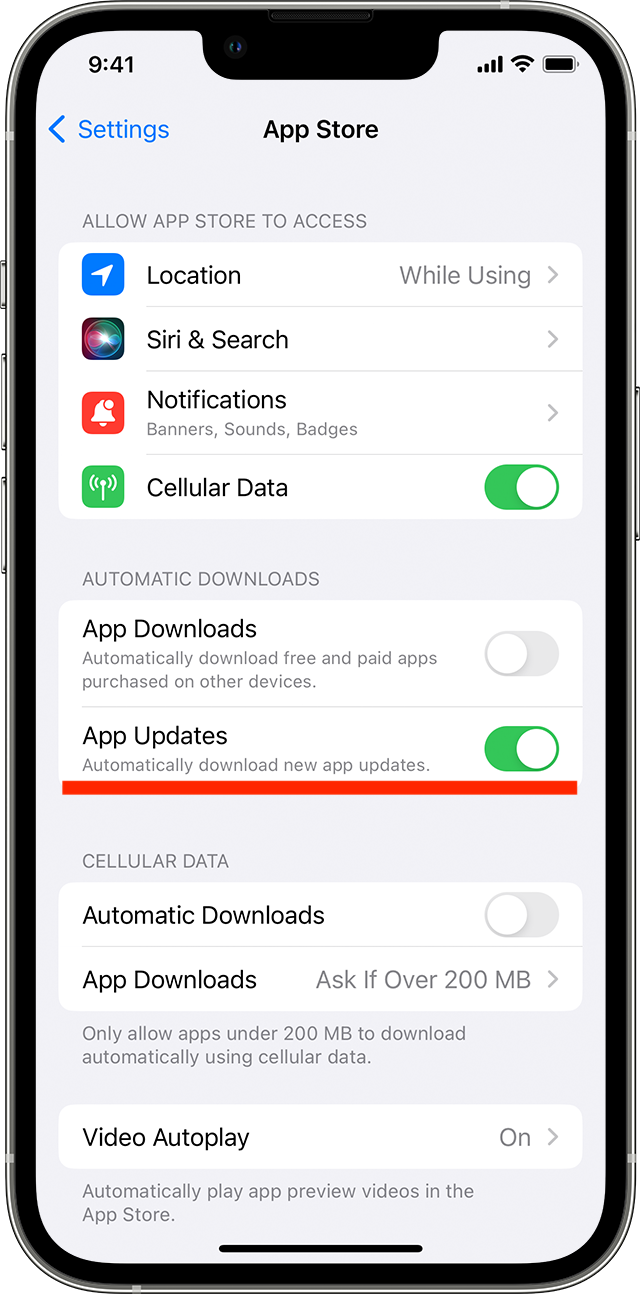
How to turn on or turn off automatic updates on your iPhone or iPad
Go to Settings.
Tap App Store.
Turn on App Updates.
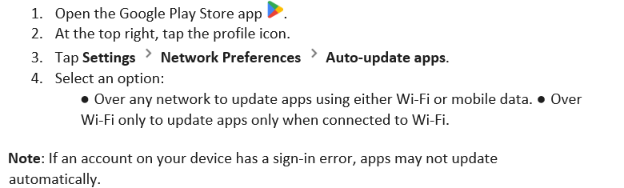
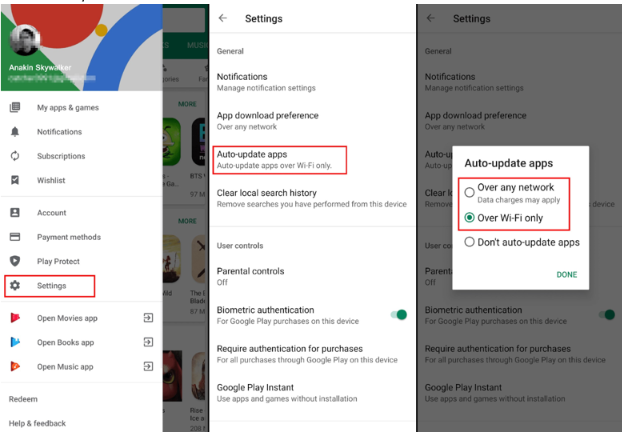
Enabling Automatic Updates on Android devices
We release updates or mobile bug fixes on a weekly basis (if necessary), and each release will require users to update the iReportSource app on their mobile device. This document shows how to enable automatic updates on an Android device so you do not have to visit the store and upgrade -- it will update with no further action required of you.
How to turn on or turn off automatic updates on your Android